
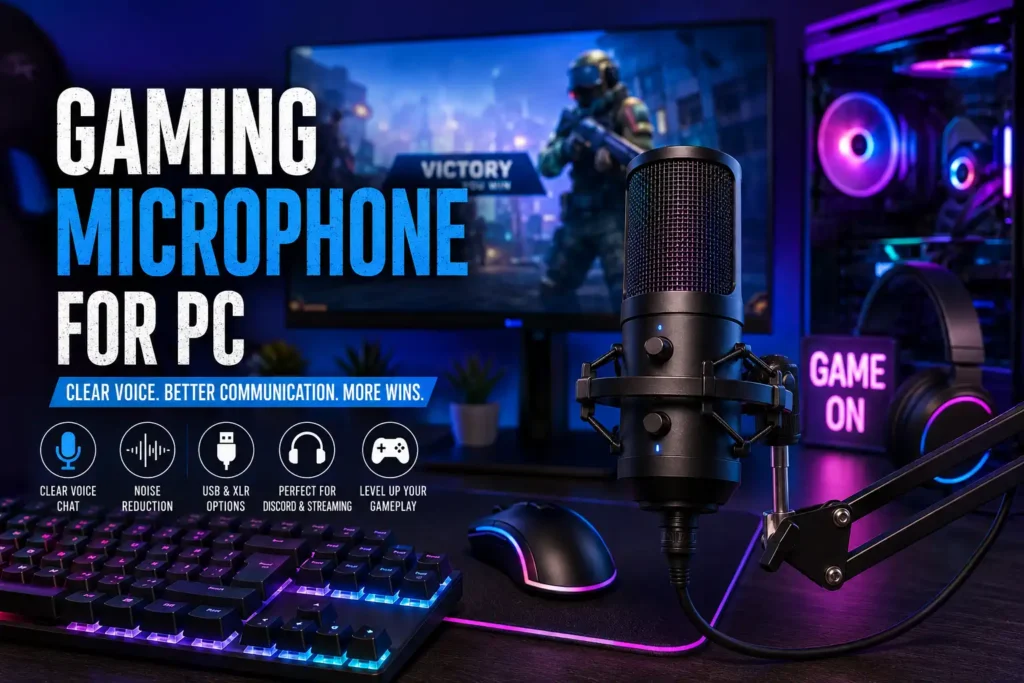
Gaming Microphone for PC: How to Choose the Right Mic for Gaming and Streaming
Have your teammates ever complained that your voice sounds distant, muffled, or buried beneath keyboard clicks? If so, you’re not alone. Many PC gamers rely on headset microphones that simply aren’t designed to deliver the level of clarity needed for modern multiplayer gaming.
A quality Gaming Microphone for PC can completely transform your communication experience. Whether you’re calling out enemy positions in Counter-Strike 2, coordinating strategies in Valorant, chatting with friends on Discord, or streaming to an audience on Twitch, a dedicated microphone ensures that your voice comes through clearly and professionally.
The good news is that today’s gaming microphones offer more options than ever before. From simple USB models that work straight out of the box to professional USB/XLR hybrid microphones that can grow with your setup, there is a solution for every type of gamer and every budget.
In this guide, we’ll examine some of the most recommended gaming microphones currently available, explain what makes them stand out, and help you choose the right microphone for your PC gaming setup.
Why a Dedicated Gaming Microphone Matters
Many gamers spend hundreds or even thousands of dollars on graphics cards, monitors, and peripherals while completely overlooking audio communication. Yet in competitive games, communication can be just as important as mechanical skill.
A dedicated gaming microphone offers several advantages over the microphone built into most gaming headsets. Voice clarity is usually much better, making it easier for teammates to understand your callouts during intense matches. Dedicated microphones also tend to provide superior background noise handling, helping reduce distractions caused by mechanical keyboards, PC fans, or room noise.
For streamers and content creators, the difference becomes even more noticeable. Viewers are often willing to tolerate average video quality, but poor audio quality can quickly drive them away. Investing in a proper microphone is often one of the most effective upgrades a creator can make.
Another benefit is flexibility. Many modern microphones can serve multiple purposes, including gaming, streaming, podcasting, online meetings, and content creation. Instead of purchasing separate devices for different activities, one quality microphone can handle them all.
Quick Comparison Table
| Product | Best For | Connection Type | Key Strength | Overall Recommendation |
|---|---|---|---|---|
| Shure MV7+ | Streaming & Gaming | USB/XLR | Versatility | Excellent |
| Elgato Wave:3 | Streaming | USB | Software Features | Excellent |
| HyperX QuadCast S | Gaming Setups | USB | Ease of Use | Excellent |
| Rode PodMic USB | Upgraders | USB/XLR | Flexibility | Excellent |
| Shure MV6 | Beginners | USB | Simplicity | Strong |
| Audio-Technica AT2020USB-X | Voice Quality | USB | Audio Detail | Strong |
| Blue Yeti | General Use | USB | Versatility | Popular |
Best Gaming Microphones for PC
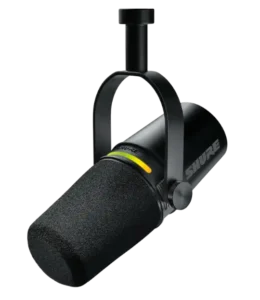
1. Shure MV7+

Best For
Gamers and streamers who want a microphone that can evolve with their setup.
Key Strengths
The Shure MV7+ has become one of the most respected microphones among gamers, streamers, podcasters, and content creators. One of its biggest advantages is its hybrid design, supporting both USB and XLR connectivity.
For beginners, this means you can plug it directly into your PC and start gaming immediately. Later, if you decide to build a professional streaming setup, you can connect it through an audio interface using XLR without replacing the microphone.
The voice quality is consistently praised for being clear, natural, and focused. This makes it particularly useful for Discord communication, competitive gaming, and live streaming.
Potential Drawbacks
The price may be difficult to justify for casual gamers who only play occasionally.
Who Should Buy It
- Streamers
- Competitive gamers
- Content creators
- Users planning future upgrades
Who Should Avoid It
- Budget-focused buyers
Check the latest price on Amazon before purchasing.
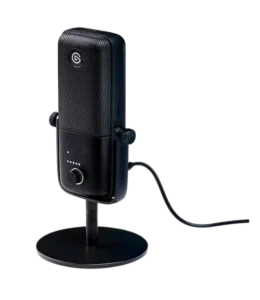
2. Elgato Wave:3
Best For
Streamers who want advanced audio control.
Key Strengths
The Elgato Wave:3 is frequently recommended because it combines strong audio performance with one of the best software ecosystems available. Elgato’s Wave Link software allows users to control game audio, Discord audio, music, alerts, and microphone levels from a single dashboard.
This is especially useful for Twitch streamers who need to manage multiple audio sources simultaneously. Instead of struggling with complicated software configurations, users can quickly create a professional audio mix.
The microphone itself delivers excellent voice clarity, making teammates and viewers hear every word clearly.
Potential Drawbacks
Some casual gamers may never use many of the software features.
Who Should Buy It
- Twitch streamers
- YouTube creators
- Gamers who stream regularly
Who Should Avoid It
- Users seeking the simplest possible setup
Read customer reviews on Amazon to see how creators use this microphone.
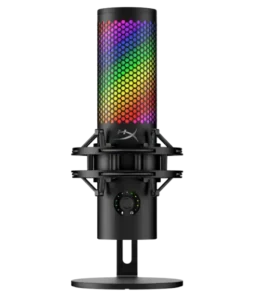
3. HyperX QuadCast S
Best For
Gamers who want performance and aesthetics.
Key Strengths
Few microphones are as recognizable within the gaming community as the HyperX QuadCast S. The built-in RGB lighting instantly makes it stand out on gaming desks and streaming setups.
Fortunately, the appeal isn’t purely visual. The microphone delivers reliable voice quality while remaining extremely easy to use. Plug it in, adjust a few settings, and you’re ready for Discord, streaming, or multiplayer gaming.
Its gamer-focused design makes it one of the easiest recommendations for players who want a dedicated microphone without dealing with complicated audio equipment.
Potential Drawbacks
Some users pay a premium for RGB features they may not need.
Who Should Buy It
- RGB enthusiasts
- Beginner streamers
- PC gamers
Who Should Avoid It
- Users focused entirely on professional audio quality
Compare this microphone with the Elgato Wave:3 before making your decision.
4. Rode PodMic USB
Best For
Gamers who want both simplicity and future flexibility.
Key Strengths
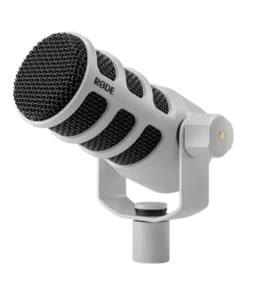
The Rode PodMic USB is one of the most flexible microphones available because it supports both USB and XLR connectivity. This allows users to start with a simple PC setup and later transition into more advanced audio systems.
Its dynamic microphone design also helps reduce unwanted room noise. This makes it particularly attractive for gamers who play in shared rooms or environments where background noise is difficult to eliminate.
For users researching a Gaming Microphone for PC, the PodMic USB often strikes an excellent balance between performance, versatility, and long-term value.
Potential Drawbacks
Dynamic microphones generally require closer positioning to achieve their best results.
Who Should Buy It
- Streamers
- Competitive gamers
- Users planning future upgrades
Who Should Avoid It
- Users who prefer highly sensitive condenser microphones
Compare this model with the Shure MV7+ to determine which better fits your setup.
5. Shure MV6
Best For
Gamers who want premium sound without complicated hardware.
Key Strengths
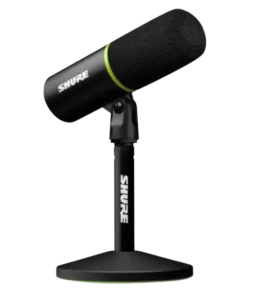
The Shure MV6 is designed to deliver the high-quality voice capture that the brand is known for while keeping setup simple. Unlike traditional XLR-based solutions, the MV6 is aimed at gamers and creators who want excellent sound with minimal effort.
Voice clarity is excellent for Discord conversations, multiplayer communication, streaming, and content creation. For gamers who spend several hours each day online, the improvement over most headset microphones can be dramatic.
The simple plug-and-play experience makes it an appealing choice for beginners who want premium audio without learning about audio interfaces and advanced equipment.
Potential Drawbacks
It lacks the upgrade flexibility offered by dual USB/XLR microphones.
Who Should Buy It
- Beginners
- Discord users
- Casual streamers
Who Should Avoid It
- Advanced users building professional XLR studios
View this model on Amazon and compare it with other gaming microphones.
6. Audio-Technica AT2020USB-X
Best For
Gamers and creators who prioritize detailed voice reproduction.
Key Strengths
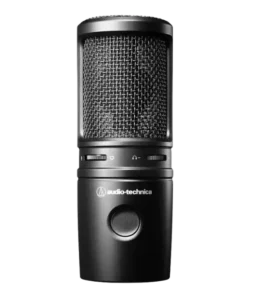
Audio-Technica has built a strong reputation in the audio industry, and the AT2020USB-X continues to be a popular recommendation for users who want studio-inspired sound quality in a USB microphone.
One of its biggest strengths is its ability to capture vocal detail. Voices sound crisp, natural, and professional, making the microphone suitable not only for gaming but also for content creation, podcasting, and voice-over work.
For PC gamers who play in relatively quiet rooms, the AT2020USB-X can deliver impressive clarity that rivals more expensive options.
Potential Drawbacks
Because it captures a lot of detail, it can also pick up more background noise than dynamic microphones.
Who Should Buy It
- Content creators
- Streamers
- Gamers with quiet setups
Who Should Avoid It
- Users gaming in noisy rooms
- Gamers with loud mechanical keyboards positioned close to the microphone
Read customer reviews on Amazon before deciding if a condenser microphone fits your environment.
7. Blue Yeti
Best For
Gamers who want a versatile all-purpose microphone.
Key Strengths
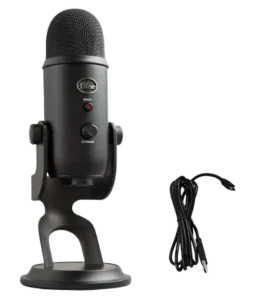
The Blue Yeti has remained one of the most recognizable USB microphones for years. While newer competitors have entered the market, it continues to be a common recommendation for beginners because of its versatility.
The microphone works well for gaming, streaming, Discord communication, video calls, podcasting, and content creation. Many creators started their online journey using a Blue Yeti because it offers an easy entry point into dedicated microphones.
Its widespread popularity also means there are countless tutorials available online for setup, optimization, and troubleshooting.
Potential Drawbacks
The microphone can capture more room noise than dynamic alternatives.
Who Should Buy It
- Beginners
- Casual streamers
- Multi-purpose users
Who Should Avoid It
- Gamers with noisy environments
Compare this microphone with the HyperX QuadCast S if you’re looking for a gaming-focused setup.
Best Gaming Microphone for Discord
Discord has become the primary communication platform for millions of gamers. Whether you’re coordinating strategies in ranked matches or simply chatting with friends, voice clarity matters.
A good Discord microphone should prioritize:
- Clear voice reproduction
- Consistent volume levels
- Good background noise management
- Easy setup
For most users, the Shure MV7+, Elgato Wave:3, and HyperX QuadCast S are among the strongest choices because they deliver excellent clarity without requiring complex audio equipment.
When choosing a Gaming Microphone for PC specifically for Discord, remember that your teammates care more about hearing your voice clearly than hearing every detail of your room. Sometimes a dynamic microphone can provide a better experience than a highly sensitive condenser microphone.
Best Gaming Microphone for Streaming
Streaming places greater demands on audio quality because viewers listen to your voice for extended periods.
A microphone that sounds acceptable during a quick Discord conversation may not provide the polished experience viewers expect from a Twitch or YouTube stream.
For streamers, the following options stand out:
Shure MV7+
Excellent balance between convenience and professional sound.
Elgato Wave:3
Powerful software ecosystem for managing multiple audio sources.
Rode PodMic USB
Flexible upgrade path thanks to USB and XLR support.
Shure SM7B
Often considered a professional benchmark for streamers willing to invest in a full XLR setup.
If streaming is your primary goal, audio quality should be treated as a long-term investment rather than an afterthought.
USB vs XLR Gaming Microphone
One of the most common questions gamers ask is whether they should choose a USB or XLR microphone.
USB Microphones
Advantages:
- Easy setup
- Plug-and-play operation
- Lower overall cost
- Ideal for beginners
- No audio interface required
Disadvantages:
- Less flexibility for future upgrades
Popular examples include:
- Elgato Wave:3
- HyperX QuadCast S
- Shure MV6
- Blue Yeti
XLR Microphones
Advantages:
- Greater customization
- Professional audio potential
- Long-term scalability
Disadvantages:
- Requires additional equipment
- Higher total cost
- More complicated setup
Popular examples include:
- Shure SM7B
- Professional studio microphones
Hybrid USB/XLR Microphones
Many gamers compare a USB vs XLR Gaming Microphone because they want the simplicity of USB today and the flexibility of XLR tomorrow.
Hybrid options such as:
- Shure MV7+
- Rode PodMic USB
provide an excellent middle ground.
For most gamers, USB remains the smartest starting point. Serious creators may eventually benefit from XLR setups.
Best Budget Gaming Microphone
A quality microphone doesn’t have to cost a fortune.
The goal of a Best Budget Gaming Microphone is to improve communication quality without forcing users to spend hundreds of dollars.
When shopping on a budget, prioritize:
- Clear voice quality
- Reliable construction
- Positive customer feedback
- Easy setup
- Good noise handling
Many gamers discover that even an affordable USB microphone can significantly outperform a headset microphone.
The key is focusing on practical performance rather than flashy marketing features.
Best Gaming Microphone Under $50
For entry-level streamers and casual gamers, a Best Gaming Microphone Under $50 can be a smart starting point.
At this price range, buyers should focus on:
- USB connectivity
- Cardioid pickup patterns
- Positive reviews
- Reliable performance
While budget microphones won’t match premium models like the Shure MV7+ or Rode PodMic USB, they can still provide a noticeable upgrade over built-in headset microphones.
For many players, this price range offers the best balance between affordability and performance.
Common Buying Mistakes PC Gamers Make
Many gamers spend money on the wrong microphone because they focus on the wrong criteria.
Common mistakes include:
Buying RGB Instead of Audio Quality
RGB lighting looks great, but sound quality should always come first.
Ignoring Room Acoustics
Even expensive microphones can sound poor in noisy rooms.
Choosing XLR Too Early
Many beginners purchase XLR microphones without understanding the additional hardware requirements.
Overpaying for Unused Features
Not every gamer needs professional broadcasting equipment.
Poor Microphone Placement
Microphone positioning often has a larger impact on audio quality than users realize.
Avoiding these mistakes can save money and improve your overall experience.
How to Choose the Right Gaming Microphone for Your Setup
Ask yourself the following questions:
- Do I mainly use Discord?
- Do I stream regularly?
- Is my room quiet or noisy?
- Do I want USB or XLR?
- Will I upgrade later?
If you’re unsure, a USB microphone is usually the safest option.
If you’re planning a long-term streaming career, a hybrid USB/XLR microphone can provide greater flexibility.
The best Gaming Microphone for PC is ultimately the one that fits your needs, environment, and budget.
FAQ
What is the best Gaming Microphone for PC?
Many gamers consider the Shure MV7+ one of the best overall options because it combines USB convenience with XLR flexibility.
Is a USB or XLR microphone better for gaming?
USB microphones are generally better for most gamers because they are easy to use and require no additional hardware.
Do gaming microphones reduce background noise?
Some microphones manage background noise better than others. Dynamic microphones are often preferred in noisy environments.
What is the best budget gaming microphone?
The best budget gaming microphone depends on your needs, but many entry-level USB microphones provide excellent value for Discord and multiplayer gaming.
Can I use a streaming microphone only for gaming?
Absolutely. Most streaming microphones work perfectly for gaming, Discord communication, and content creation.
Conclusion
Choosing the right Gaming Microphone for PC can dramatically improve your gaming experience, whether you’re communicating with teammates, streaming to an audience, or creating content online.
For most gamers, USB microphones offer the ideal combination of simplicity and performance. Models such as the Shure MV7+, Elgato Wave:3, HyperX QuadCast S, and Rode PodMic USB continue to earn strong recommendations because they balance voice quality, ease of use, and long-term value.
Whether you’re looking for a premium microphone, comparing a USB vs XLR Gaming Microphone, searching for the Best Budget Gaming Microphone, or trying to find the Best Gaming Microphone Under $50, investing in clear communication is one of the smartest upgrades you can make for your PC gaming setup.